
Knowing your Etisalat number can be as straightforward as dialing a quick code, yet it can also be frustrating if you forget it. Fortunately, there are five simple methods to check your number efficiently. Regardless of whether you prefer using a USSD code, calling another device, or leveraging the e& UAE app, each option offers a reliable way to retrieve your information. Let’s explore these methods to guarantee you’re never left in the dark about your Etisalat number.
Check Etisalat Number Via USSD Code
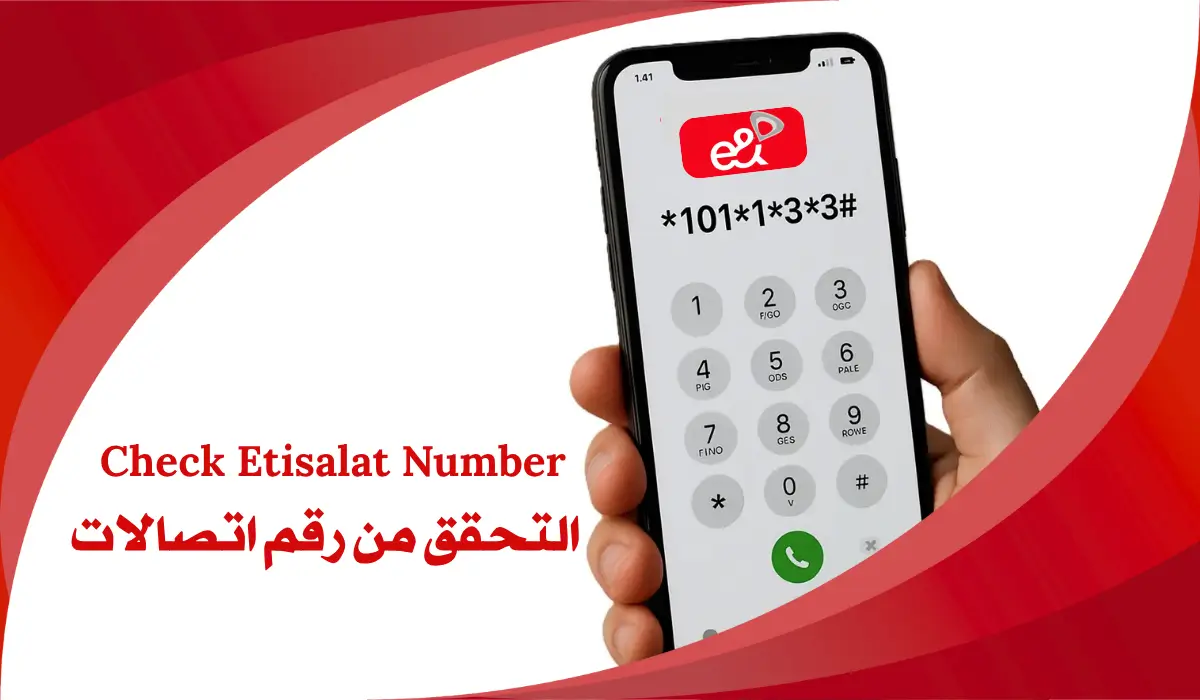
If you need to check your Etisalat number quickly, using a USSD code is your best bet. Simply dial *101*1*3*3# to get your number without traversing through menus. This shortcut saves you time and is particularly useful when you need your number for verification or registration tasks.
Shortcut Code to Find Your Etisalat Number
To quickly check your Etisalat number, you can use a straightforward USSD code that eliminates the need for exploring through menus. Simply dial *101*1*3*3# on your mobile device. This USSD code simplifies the process, providing mobile convenience by bypassing multiple steps in the menu. Once you enter the code, the system will respond almost instantly with your Etisalat number displayed on your screen. This method is particularly useful when you need to remember your number for tasks like setting up two-factor authentication or completing forms. Remember to save this USSD code for quick access in the future, making it easier to retrieve your number whenever necessary.
Finding Etisalat Number by Calling Another Number
Calling another number is a straightforward method to find your Etisalat number. When you make a call from your Etisalat SIM to a different mobile or landline, your number appears on the recipient’s caller ID, assuming you haven’t enabled number withholding. Verify you have enough credit or an active plan to complete the call. This method is effective for number verification and confirming which SIM slot is active in dual-SIM devices. For best results, call a trusted contact or a secondary phone you can access.
| Step | Action | Notes |
|---|---|---|
| 1. Make a Call | Dial a friend’s number | Use another mobile or landline |
| 2. Check Caller ID | Ask them to verify the number | Verify they see your number |
| 3. Confirm | Verify your Etisalat number | This confirms active service |
Find Etisalat Number through the SIM Card Packaging
The physical SIM card packaging serves as a reliable source for finding your Etisalat number. When you purchase a new SIM, the number is typically printed on the credit-card-sized cardboard pack. This information often appears next to the PUK code and serial number, which are vital for SIM card identification. Retaining this packaging is significant, as it provides a permanent record of your number, especially if you haven’t memorized it yet. This is particularly important for new residents in Dubai or businesses acquiring multiple lines. Keeping the packaging safe guarantees you can quickly retrieve your primary Etisalat identifier, safeguarding against issues like phone loss or network problems. Always consider the packaging’s importance in your account management.
Know Your Etisalat Number Using e& UAE App
How can you quickly find your Etisalat number using the e& UAE app? The e& UAE app simplifies this process, offering you a user-friendly interface. After downloading and registering, your Etisalat number appears on the main dashboard. This method guarantees quick access to your details without needing to remember codes.
Here are some key app features and user benefits:
- Displays your Etisalat number prominently.
- Shows current plan details and data balance.
- Allows easy management of linked accounts for home services.
- Provides secure access to account settings and services.
- Enables balance transfers and package subscriptions directly through the app.
Using this app optimizes your experience, making it easier to manage your Etisalat services.
What is Etisalat?
Etisalat is a leading telecommunications provider in the United Arab Emirates, known for its extensive range of services and advanced network infrastructure. Established in 1976, it has a rich history marked by significant telecommunications innovations. Over the years, Etisalat has evolved from a state monopoly into a key player in the global tech landscape.
| Service Type | Description | Key Features |
|---|---|---|
| Mobile Telephony | Voice services for individuals and businesses | 5G connectivity, nationwide coverage |
| Fixed-Line Services | Traditional landline services | Reliable and high-quality |
| Broadband Internet | High-speed internet access | Fiber optic technology |
| IPTV | Television services via internet | Extensive channel selection |
| ICT Solutions | Corporate communication services | Tailored business solutions |
As a vital enabler of digital life in the UAE, Etisalat continues to drive connectivity and innovation.
How to Download e& UAE (Etisalat) App?
For users looking to manage their Etisalat services conveniently, downloading the e& UAE app is a straightforward process. Start by visiting the Apple App Store or Google Play Store on your device. Search for “e& UAE” and select the official app published by Emirates Telecommunications Group Company (e&). Tap “Get” or “Install” to begin downloading. Once installed, you gain access to various app features that enhance your experience, such as:
- Easy account management
- Real-time data balance tracking
- Bill payment options
- Service package subscriptions
- Customer support access
These user benefits help simplify your interactions with Etisalat, making certain you stay informed about your services and usage. Make certain to download from official stores to guarantee security and reliability.
How to Register on e& UAE (Etisalat) App?
To register on the e& UAE app, begin by launching the application on your device after downloading it from the official app store. On the welcome screen, enter your 10-digit Etisalat number and tap “Proceed.” You’ll receive a One-Time Password (OTP) via SMS for verification. Enter the OTP promptly to complete the registration process.
| Step | Action | Description |
|---|---|---|
| 1 | Launch the app | Open the e& UAE app on your device. |
| 2 | Enter your number | Input your 10-digit Etisalat number. |
| 3 | Receive OTP | Check your SMS for the One-Time Password. |
| 4 | Confirm registration | Enter the OTP to finalize your account. |
Once registered, you can explore various app features, enhancing your experience with Etisalat services.
How to Check Etisalat Number Owner?
If you need to find out who owns a specific Etisalat number, you can follow a few straightforward methods. Here are some reliable options for ownership confirmation:
- Contact Etisalat Customer Service: Call or visit a local store for assistance.
- Use the e& UAE App: After logging in, you can view account details tied to the number.
- Check with Friends or Family: If you know someone who might have that number, ask them directly.
- Social Media: Search for the number on platforms like WhatsApp or Facebook.
- Etisalat Account Verification: Some services require you to verify the account linked to the number for privacy reasons.
These methods can help you gain clarity on the number’s ownership.